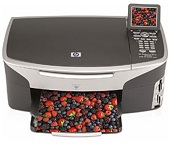
HP Photosmart 2713 Driver Download
- 5 drivers
- Supports Windows
- Windows · macOS · Linux
- ✓ Safe & free
This printer has a unique design includes a height of 21.21cm, a width of 46.4 cm. Also, it comes with a depth of 37.2 cm and a weight of 8.5 kg. for Windows Operating systems, it supports Windows 98, Windows 98 SE, Windows Me, Windows 2000 and Windows XP. The minimum requirements for smooth running include an Intel Pentium II, Celeron or compatible processor. Other conditions include 128 MB of RAM, 795 MB of free hard disk space.HP Photosmart 2713 cartridges are essential components for your printer. These cartridges are designed to work seamlessly with your HP Photosmart 2713 printer, ensuring high-quality prints every time. Using genuine HP cartridges is important, as they are engineered to meet strict quality standards. The use of non-genuine cartridges can result in poor print quality, reduced printer lifespan, and can even damage your printer. The HP Photosmart 2713 cartridges come in various colors and sizes, including black, cyan, magenta, and yellow. They are also available in standard and high-yield options, allowing you to choose the best cartridge to suit your printing needs. When it comes to replacing your cartridges, it's important to follow the manufacturer's instructions. This includes turning off the printer, opening the cartridge access door, and carefully removing the old cartridge before inserting the new one. By using genuine HP cartridges in your HP Photosmart 2713 printer, you can ensure optimal performance and longevity for your printer. So, whether you're printing important documents or cherished memories, trust in HP to deliver exceptional results every time.HP offers a range of high-quality ink cartridges to meet your printing needs. The HP94 Black Original Ink Cartridge can produce up to 480 pages, while the HP 96 Black Inkjet Print Cartridge can print up to 860 pages. For color printing, the HP 95 Tri-color Inkjet Print Cartridge can print up to 330 pages, and the HP 97 Tri-color Original Ink Cartridge can produce up to 560 pages. For those looking to produce stunning photo prints, the HP 99 Photo Original Ink Cartridge can produce up to 130 pages of high-quality photos, and the HP 100 Gray Photo Original Ink Cartridge can produce up to 80 pages of professional-grade gray photos. No matter what your printing needs may be, HP's range of ink cartridges can provide you with high-quality prints that are sure to impress. So why wait? Get your hands on an HP ink cartridge today and start printing like a pro!This printer is compatible with Apple Macintosh operating systems, including Mac OS 9.1.x and OS X (versions 10.1.x or higher). For optimal performance, it is recommended to have a G4 processor and a minimum of 124 MB of RAM for OS 9 and 256 MB of RAM for OS X. The latter includes versions 10.2.3 or higher, 10.3.x or higher, and 10.4 or higher.
HP Photosmart 2713 Driver Downloads
| Driver | Operating System | Version | Size | Download |
|---|---|---|---|---|
| basic Recommended | Windows | — | 59.5 MB | Download |
| All in One printer | Windows 10Windows 8.1Windows 8Windows 7Windows Vista | — | 163.3 MB | Download |
| All in One printer | Windows XP | — | 428.8 MB | Download |
| All in One printer | macOS | — | 145.6 MB | Download |
| All in One printer | macOS | — | 189.5 MB | Download |
How to Install the HP Photosmart 2713 Driver
- Click the recommended driver package above and save the file to your PC.
- Open the downloaded file and follow the on-screen HP installer.
- Connect the Photosmart 2713 by USB or network when prompted.
- Finish and print a test page to confirm the driver works.