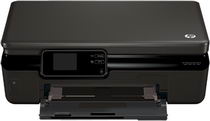
HP Photosmart 5514 Driver Download
- 10 drivers
- Supports Windows
- Windows · macOS · Linux
- ✓ Safe & free
Printer DescriptionThe HP Photosmart 5514 is a versatile device that comes in three distinct varieties, each with a unique part number. These include the B111c (part number CQ177B), B111d (part number CQ177C), and B111h (part number CQ183A). With physical dimensions of 5.5 x 17 x 13 inches (HWD) and a lightweight of 11.12 pounds, this printer is suitable for both home and office environments. Its compact size and portability make it easy to move from one location to another. In terms of performance, the HP Photosmart 5514 produces exceptional quality prints at a relatively good speed. Whether you need to print documents or photos, this device can handle all your printing needs with ease. Overall, the HP Photosmart 5514 is an excellent choice for anyone looking for a reliable and efficient printer. Its unique part numbers and compact design make it a standout option in the market.
HP Photosmart 5514 Driver Downloads
| Driver | Operating System | Version | Size | Download |
|---|---|---|---|---|
| Full Feature Drivers Recommended | Windows | — | 56 MB | Download |
| Basic | Windows 10Windows 8.1Windows 8Windows 7Windows VistaWindows XP | — | 20.7 MB | Download |
| Basic | Windows 10Windows 8.1Windows 8Windows 7Windows Vista | — | 22.3 MB | Download |
| ePrint Software Network and Wireless Connected Printers | Windows 10Windows 8.1Windows 8Windows 7 | — | 26.2 MB | Download |
| ePrint Software Network and Wireless Connected Printers | Windows 10Windows 8.1Windows 8Windows 7 | — | 31.2 MB | Download |
| Easy Start Printer Setup | macOS | — | 9.1 MB | Download |
| Full Feature Drivers | macOS | — | 126.8 MB | Download |
| Full Feature Drivers | macOS | — | 156.5 MB | Download |
| Full Feature Drivers | macOS | — | 129.3 MB | Download |
| ePrint Software Network and Wireless Connected Printers | macOS | — | 6.6 MB | Download |
How to Install the HP Photosmart 5514 Driver
- Click the recommended driver package above and save the file to your PC.
- Open the downloaded file and follow the on-screen HP installer.
- Connect the Photosmart 5514 by USB or network when prompted.
- Finish and print a test page to confirm the driver works.