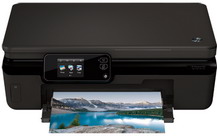
HP Photosmart 5520 Driver Download
- 8 drivers
- Supports Windows 11
- Windows · macOS · Linux
- ✓ Safe & free
If you seek a versatile printer, the HP Photosmart 5520 printer is the optimal choice. This all-encompassing printer can produce high-quality copies, scans, and prints at exceptional speeds. It boasts three connectivity alternatives, including Wireless, Wireless Direct, and USB. The highlight of this printer is its support of ePrint and AirPrint capabilities.The printer is compatible with a range of Windows operating systems, including Windows 10, Windows 8, Windows 7, Windows Vista, and Windows XP 32-bit Service Pack 2. To effectively run the printer, Windows 10/8/7 requires a minimum of 1GB RAM, while Windows Vista/XP requires 512MB RAM. Additionally, the printer requires a minimum of 2GB free disk space for Windows 10/8/Vista, 1.5GB free disk space for Windows 7, and 750MB free disk space for Windows XP.
HP Photosmart 5520 Driver Downloads
| Driver | Operating System | Version | Size | Download |
|---|---|---|---|---|
| Full Feature Drivers Recommended | Windows 11Windows 10Windows 8.1Windows 8Windows 7Windows VistaWindows XP | — | 63.5 MB | Download |
| Basic | Windows 10Windows 8.1Windows 8Windows 7Windows VistaWindows XP | — | 23 MB | Download |
| Basic | Windows 11Windows 10Windows 8.1Windows 8Windows 7Windows Vista | — | 24.8 MB | Download |
| ePrint Software Network and Wireless Connected Printers | Windows 10Windows 8.1Windows 8Windows 7 | — | 26.2 MB | Download |
| ePrint Software Network and Wireless Connected Printers | Windows 10Windows 8.1Windows 8Windows 7 | — | 31.2 MB | Download |
| Easy Start Printer Setup | macOS | — | 9.1 MB | Download |
| Full Feature Drivers | macOS | — | 126.8 MB | Download |
| Full Feature Drivers | macOS | — | 167.3 MB | Download |
How to Install the HP Photosmart 5520 Driver
- Click the recommended driver package above and save the file to your PC.
- Open the downloaded file and follow the on-screen HP installer.
- Connect the Photosmart 5520 by USB or network when prompted.
- Finish and print a test page to confirm the driver works.