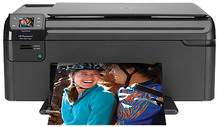
HP Photosmart B109a Driver Download
- 4 drivers
- Supports Windows 10
- Windows · macOS · Linux
- ✓ Safe & free
The HP Photosmart B109a is the ultimate all-in-one printer that fulfills all your printing needs. This versatile printer offers a range of functions, including scanning, copying, and printing. It ensures effortless printing of high-quality documents with remarkable precision. The device is certified by the Energy Star program, which means it is designed to use minimal natural resources and power. This makes it an eco-friendly choice for those who are conscious of the environment. With the HP Photosmart B109a, you can print professional-quality documents with ease. It is equipped with advanced features that enable it to produce sharp and clear prints, making it an ideal choice for printing reports, presentations, and other important documents. In addition, this printer is also capable of scanning and copying documents with exceptional clarity and detail. Its user-friendly interface and intuitive controls make it easy to use, even for those who are not tech-savvy. Overall, the HP Photosmart B109a is a reliable and efficient all-in-one printer that is perfect for both home and office use. Its impressive capabilities, eco-friendliness, and ease of use make it a top choice for anyone looking for a high-quality printer.
HP Photosmart B109a Driver Downloads
| Driver | Operating System | Version | Size | Download |
|---|---|---|---|---|
| Full Feature Driver Recommended | Windows 10Windows 8.1Windows 8 | — | 137.3 MB | Download |
| Full Feature Driver | Windows 7Windows VistaWindows XP | — | 143.3 MB | Download |
| Basic Drivers | Windows 7Windows VistaWindows XP | — | 38.4 MB | Download |
| Full Feature Drivers | macOS | — | 137.6 MB | Download |
How to Install the HP Photosmart B109a Driver
- Click the recommended driver package above and save the file to your PC.
- Open the downloaded file and follow the on-screen HP installer.
- Connect the Photosmart B109a by USB or network when prompted.
- Finish and print a test page to confirm the driver works.