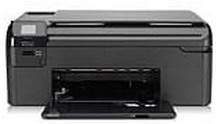
HP Photosmart B109d Driver Download
- 4 drivers
- Supports Windows 10
- Windows · macOS · Linux
- ✓ Safe & free
The HP Photosmart B109d is the perfect all-in-one printer for both home and commercial use. It boasts a small and compact design, measuring 7.4 inches in height, 17.9 inches in width, and 16.5 inches in depth. Additionally, it only weighs 15.7 lb, making it a lightweight option. With its multifunctionality, the HP Photosmart B109d is a versatile tool that can handle various tasks. Its unique features include scanning, copying, and printing. The device also boasts a high-quality printing resolution and fast printing speeds, making it an efficient choice for busy individuals. In terms of connectivity, the HP Photosmart B109d features both wireless and USB options, providing users with flexibility and convenience. Its user-friendly interface and intuitive controls make it easy to use, even for beginners. Overall, the HP Photosmart B109d is a reliable and efficient all-in-one printer that can handle all your printing needs, both at home and in a commercial setting.Utilizing drop-on-demand thermal inkjet printing technology, the Printer operates on the PCL3 GUI language. With a maximum resolution support of up to 4800 dpi, this device provides unparalleled printing quality. The printing speed is highly dependent on the document's complexity, as expected.
HP Photosmart B109d Driver Downloads
| Driver | Operating System | Version | Size | Download |
|---|---|---|---|---|
| Full Feature Driver Recommended | Windows 10Windows 8.1Windows 8 | — | 137.3 MB | Download |
| Full Feature Driver | Windows 7Windows VistaWindows XP | — | 143.3 MB | Download |
| Basic Drivers | Windows 7Windows VistaWindows XP | — | 38.4 MB | Download |
| Full Feature Drivers | macOS | — | 137.6 MB | Download |
How to Install the HP Photosmart B109d Driver
- Click the recommended driver package above and save the file to your PC.
- Open the downloaded file and follow the on-screen HP installer.
- Connect the Photosmart B109d by USB or network when prompted.
- Finish and print a test page to confirm the driver works.