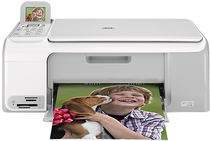
HP Photosmart C4150 Driver Download
- 10 drivers
- Supports Windows 10
- Windows · macOS · Linux
- ✓ Safe & free
The HP Photosmart Printer C4150 is a versatile solution for all your printing, scanning, and copying needs. It boasts support for a wide range of memory cards including Memory Stick, Duo, Pro, SD, and Multimedia Card. This feature-packed printer is an excellent choice for small business and companies alike. One of the standout features of this printer is its low power consumption, using only 40 watts. This is a great benefit for those looking to save on energy costs. Additionally, the HP Photosmart Printer C4150 supports various types of paper, including Plain paper, Photo paper, Envelopes, Cards, and labels, to meet all your printing needs. Overall, the HP Photosmart Printer C4150 is a reliable and efficient choice for anyone looking for a high-quality printer that can handle a variety of tasks. With its impressive range of features and support for different types of media, it's an excellent investment for any business or individual.
HP Photosmart C4150 Driver Downloads
| Driver | Operating System | Version | Size | Download |
|---|---|---|---|---|
| Full Feature Drivers Recommended | Windows 10Windows 8.1Windows 8 | — | 259.2 MB | Download |
| Full Feature Drivers | Windows 7 | — | 290.3 MB | Download |
| Full Feature Drivers | Windows Vista | — | 159.3 MB | Download |
| Basic Print and Scan | Windows Vista | — | 32.9 MB | Download |
| Full Feature Drivers | Windows XP | — | 298.4 MB | Download |
| Full Feature Drivers | Windows XP | — | 289.7 MB | Download |
| Basic Print and Scan | Windows XP | — | 67 MB | Download |
| Basic Print and Scan | Windows XP | — | 48.4 MB | Download |
| Full Feature Drivers | macOS | — | 156.2 MB | Download |
| Full Feature Drivers | macOS | — | 201.4 MB | Download |
How to Install the HP Photosmart C4150 Driver
- Click the recommended driver package above and save the file to your PC.
- Open the downloaded file and follow the on-screen HP installer.
- Connect the Photosmart C4150 by USB or network when prompted.
- Finish and print a test page to confirm the driver works.