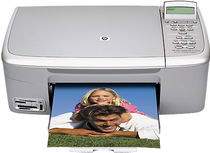
HP PSC 1613 Driver Download
- 7 drivers
- Supports Windows 10
- Windows · macOS · Linux
- ✓ Safe & free
Introducing the HP PSC 1600 series - a versatile all-in-one printer that is engineered for convenience and portability. With the ability to print, copy, and scan, this unique device is the go-to solution for those who need a compact and efficient printing solution. Measuring at 171 x 438 x 283 mm (HWD) and weighing just 5.5 Kg, this printer is designed to be portable without compromising on functionality. As a member of the HP PSC 1600 series, this printer is part of a family that includes other models like the HP PSC 1600, 1603, 1605, 1610xi, and 1610v. It's important to note that not all models are available in all regions and countries. So, make sure to check availability before making a purchase. With its all-in-one capabilities and convenient size, the HP PSC 1600 series is the perfect solution for those who need a reliable and portable printer.
HP PSC 1613 Driver Downloads
| Driver | Operating System | Version | Size | Download |
|---|---|---|---|---|
| Full Feature Drivers Recommended | Windows 10Windows 8.1Windows 8 | — | 326.2 MB | Download |
| Full Feature Drivers | Windows 7 | — | 362.7 MB | Download |
| Full Feature Drivers | Windows Vista | — | 163.3 MB | Download |
| Full Feature Drivers | Windows XP | — | 426.9 MB | Download |
| Basic Drivers | Windows XP | — | 39.7 MB | Download |
| Full Feature Drivers | macOS | — | 150.5 MB | Download |
| Full Feature Drivers | macOS | — | 190.3 MB | Download |
How to Install the HP PSC 1613 Driver
- Click the recommended driver package above and save the file to your PC.
- Open the downloaded file and follow the on-screen HP installer.
- Connect the PSC 1613 by USB or network when prompted.
- Finish and print a test page to confirm the driver works.