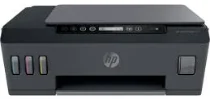
HP Smart Tank 515 Driver Download
- 5 drivers
- Supports Windows 11
- Windows · macOS · Linux
- ✓ Safe & free
The HP Smart Tank 515 is a wireless all-in-one printer that comes equipped with an internal manual duplex printing driver. This printer is capable of producing black documents at a speed of up to 11 pages per minute (ppm) and color printing at a rate of 5 ppm. The resolution capability of this printer is impressive, with a maximum of 1200 x 1200 dots per inch (dpi). The manual print area of the HP Smart Tank 515 measures about 216 x 355 mm, while the print language used is the HP PCL 3 GUI. With this printer, you have the ability to print on both sides of the paper, thanks to its automatic duplex printing feature. In terms of connectivity, the HP Smart Tank 515 offers wireless connectivity options, meaning that you can print from anywhere in the room. This feature is particularly useful for those working in busy office environments where multiple people need to access the printer at the same time. Overall, the HP Smart Tank 515 is an excellent choice for those in need of an all-in-one printer that offers impressive printing speeds and high resolution capabilities.
HP Smart Tank 515 Driver Downloads
| Driver | Operating System | Version | Size | Download |
|---|---|---|---|---|
| Full Feature Driver and Software Offline Use Only Recommended | Windows 11Windows 10Windows 8.1Windows 8Windows 7 | — | 284.5 MB | Download |
| Easy Start Printer Setup | Windows 11Windows 10 | — | 11.4 MB | Download |
| Easy Start Printer Setup | Windows 8.1Windows 8 | — | 11.4 MB | Download |
| Easy Start Printer Setup | Windows 7 | — | 11.4 MB | Download |
| Easy Start | macOS | — | 9.1 MB | Download |
How to Install the HP Smart Tank 515 Driver
- Click the recommended driver package above and save the file to your PC.
- Open the downloaded file and follow the on-screen HP installer.
- Connect the Smart Tank 515 by USB or network when prompted.
- Finish and print a test page to confirm the driver works.