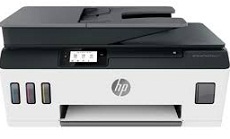
HP Smart Tank Plus 571 Driver Download
- 5 drivers
- Supports Windows 11
- Windows · macOS · Linux
- ✓ Safe & free
The HP Smart Tank Plus 571 is an exceptional device with cutting-edge wireless capabilities that enable multifunctional performance. Its outstanding features include printing, scanning, and copying utilizing an automatic document feeder (ADF) and wireless printing. With a print speed of up to 11 pages per minute (ppm) on A4 paper, this machine is a speedy performer. Meanwhile, color printing at the same ISO mode exhibits a rate of 5 ppm. To ensure optimal performance, this printer supports the HP Smart Tank Plus 571 Basic Driver for windows. With this driver, users can easily access the printer's full range of features and capabilities. Whether it's printing a document, scanning a photo, or copying a report, this device can handle it all with ease. With its unique wireless feature, this machine offers unparalleled convenience and flexibility, allowing users to print from anywhere, anytime. Whether you're at home or in the office, this printer can seamlessly connect to your computer or mobile device over Wi-Fi, making it the perfect choice for busy professionals on the go. Overall, the HP Smart Tank Plus 571 is a top-of-the-line device that delivers exceptional performance and versatility. With its advanced features and capabilities, this printer is an excellent investment for anyone looking to streamline their printing, scanning, and copying needs.
HP Smart Tank Plus 571 Driver Downloads
| Driver | Operating System | Version | Size | Download |
|---|---|---|---|---|
| Full Feature Driver Recommended | Windows 11Windows 10Windows 7 | — | 226.1 MB | Download |
| Basic Driver IT Professional Use only | Windows 10Windows 7 | — | 61.6 MB | Download |
| Basic Driver IT Professional Use only | Windows 11Windows 10Windows 7 | — | 2 KB | Download |
| Easy Start Printer Setup | Windows 11Windows 10 | — | 11.3 MB | Download |
| Easy Start Printer Setup | Windows 7 | — | 11.3 MB | Download |
How to Install the HP Smart Tank Plus 571 Driver
- Click the recommended driver package above and save the file to your PC.
- Open the downloaded file and follow the on-screen HP installer.
- Connect the Smart Tank Plus 571 by USB or network when prompted.
- Finish and print a test page to confirm the driver works.