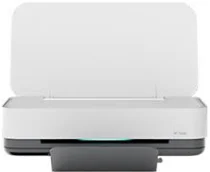
HP Tango Smart Home Driver Download
- 5 drivers
- Supports Windows 11
- Windows · macOS · Linux
- ✓ Safe & free
The HP Tango Smart Home Printer model is a unique and exceptional product. It comes with the HP 64 Setup Black and tri-color Instant Ink ready cartridges, a power cable, an instant ink flyer, an ink caution flyer, and a setup poster. But what sets it apart is its Wi-Fi feature, which provides seamless connectivity options. Moreover, the HP Tango Smart Home Printer also boasts wireless capability with an inbuilt Wi-Fi 802.11n BLE. This ensures that users can easily connect their devices to the printer without the need for cables. To ensure optimal performance in a typical work environment, the recommended operating humidity for this printer is between 20 and 80%, with non-condensation. Additionally, the HP Tango Smart Home driver for windows supports feature driver and easy start printer setup software, making it simple and convenient for users to set up and use.
HP Tango Smart Home Driver Downloads
| Driver | Operating System | Version | Size | Download |
|---|---|---|---|---|
| Full Feature Driver Recommended | Windows 11Windows 10Windows 8.1Windows 8Windows 7 | — | 88.4 MB | Download |
| Easy Start Printer Setup | Windows 11Windows 10 | — | 11.4 MB | Download |
| Easy Start Printer Setup | Windows 8.1Windows 8 | — | 11.4 MB | Download |
| Easy Start Printer Setup | Windows 7 | — | 11.4 MB | Download |
| Easy Start | macOS | — | 9.1 MB | Download |
How to Install the HP Tango Smart Home Driver
- Click the recommended driver package above and save the file to your PC.
- Open the downloaded file and follow the on-screen HP installer.
- Connect the Tango Smart Home by USB or network when prompted.
- Finish and print a test page to confirm the driver works.